FDA Product Classification Database: look up a device product code
The FDA Product Classification Database lists every medical device category the FDA recognizes, each with a three-letter product code, a risk class and the regulation that governs it. Here is how to look up a product code, read the record, and use it to find every device and submission in that category.
The catch: A product code tells you a device category's class and regulation, not who is in it — the cleared devices and the trials under each code sit in other databases you search one by one.
ClinicaLister finds the trials for the drugs, devices and diseases you track — under every drug name and disease subtype, in the U.S. and EU — and shows each one beside its approvals, label and safety data. Every fact names its source, and changes reach you by email. Join every FDA product code to the cleared devices under it and the clinical trials testing them, with device class and specialty as dashboard filters.
FDA Product Classification in ClinicaLister
What is FDA Product Classification?
The Product Classification Database is the FDA's catalogue of device categories. In the FDA's words, "the name and product code identify the generic category of a device": every infusion pump, urinalysis analyzer or coronary stent on the U.S. market sits under a three-letter product code such as KQO, and that code is what appears on 510(k)s, PMAs, establishment listings, GUDID records and adverse event reports.
Each product code carries its regulatory facts: device class (I, II or III, from lowest to highest risk, plus unclassified codes), the 7-digit classification regulation in 21 CFR Parts 862–892, the review panel and medical specialty, the premarket submission it requires — 510(k), PMA, 510(k) exempt, HDE and others — and flags for implants, life-sustaining devices, GMP exemption, third-party review and summary malfunction reporting.
The FDA has classified about 1,700 generic device types by regulation; product codes split those further, so there are several thousand codes. Regulatory teams use the database to find the classification and pathway for a new device; competitive-intelligence and business-development teams use the product code as the key that lists every competitor in a category.
- Published by
- U.S. Food and Drug Administration (CDRH)
- Updated
- Download files replaced every Sunday (FDA); openFDA lists its copy as monthly
- Official site
- FDA Product Classification Database
How to search FDA Product Classification
The database is searched on accessdata.fda.gov, downloaded as a weekly file, or queried through openFDA. The product code is what you take away — everything else in FDA's device data is keyed by it.
- 1
Search by device name or product code
On the classification page, type part of the device name ("infusion pump") or a known three-letter product code. Narrow with review panel, regulation number, submission type, device class, and the implanted, life-sustaining, third-party-eligible and summary-malfunction-reporting filters.
- 2
Read the product code record
Each record shows the device name, regulation description and number (linked to the eCFR text), medical specialty, review panel, the FDA office that does the premarket review, the submission type, device class and the GMP-exempt, implant and life-sustaining flags. Read the regulation itself to confirm the class and any exemption limits.
- 3
Open the TPLC report for the code
The Total Product Life Cycle link on the record gathers what FDA holds for that product code — premarket submissions and recalls where they exist — filtered from a year you choose, back to 2011.
- 4
Take the product code into the other device databases
Search the 510(k), PMA, De Novo, recall, MAUDE and establishment registration databases by the same product code to list every cleared device, firm and safety report in the category.
- 5
Download the file or use openFDA
The FDA publishes foiclass.zip, a pipe-delimited text file of 18 data elements replaced every Sunday. openFDA serves the same catalogue at api.fda.gov/device/classification.json, for example search=device_class:3, free and with optional API keys for higher daily limits.
Limits of the official search
- A product code is a category, not a device: the record tells you nothing about which companies hold clearances under it until you search the submission databases separately.
- Name search matches the FDA's device-name wording, which is often inverted ("Pump, Infusion"), so a plain-language search can miss the code you need.
- Nothing links a product code to the clinical trials testing devices in that category.
- There is no change alert: a new product code or a reclassification only shows up when you re-run the search or diff the weekly file.
FDA Product Classification on its own stops here
See every cleared device and trial behind a product code
Founding pricing for early-access members
What ClinicaLister adds to FDA Product Classification
Every product code, joined to the devices under it
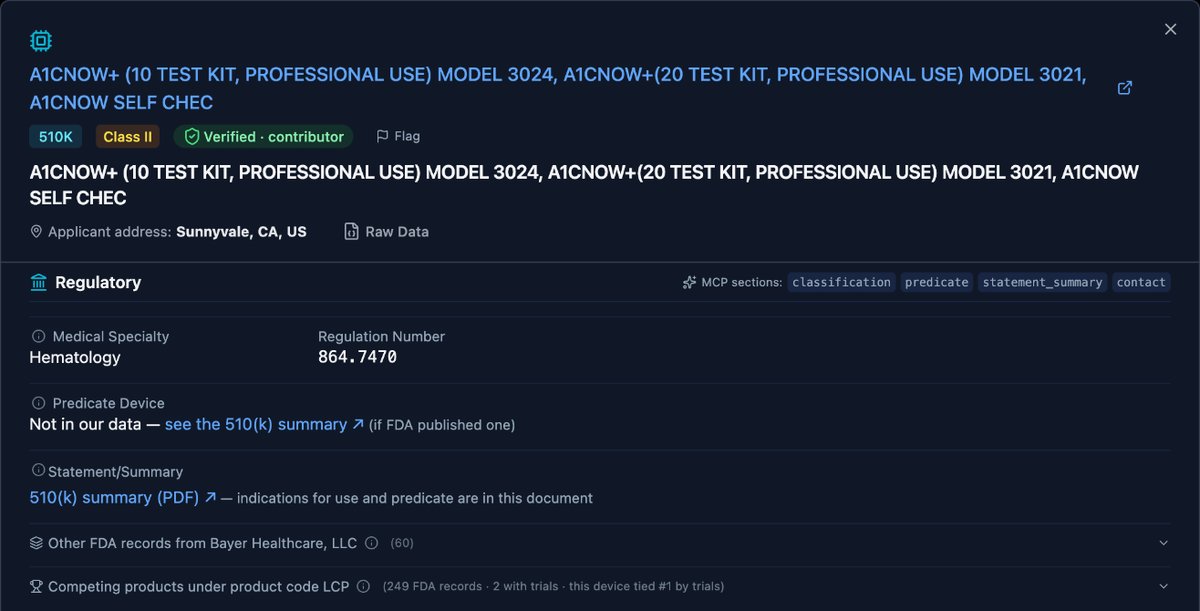
The full classification catalogue is held and joined by product code to the 510(k) and PMA records, so every device record shows its class, medical specialty, regulation number, flags and the FDA classification text — no second lookup.
Product code to clinical trials
Every device linked to a trial resolves to its product code, so you can see which trials test devices in a category. Links are made only where the applicant matches the trial's lead sponsor, then reviewed, so they cover a minority of device trials — the subset they cover is defensible.
Class and specialty as dashboard filters
In the Drug & Device tab, the device class and medical specialty charts cross-filter the trials you follow, and the device table adds columns for medical specialty, regulation number, implant, life-sustaining, GMP-exempt and the FDA classification text.
Ask Claude: from a category name to its codes
Ask Claude, through the ClinicaLister connector, to search the catalogue by category words to resolve product codes, then pull the cleared-device roster, trials, recalls and adverse event reports for each code.
FDA Product Classification coverage
7,000+
FDA product codes — the full catalogue
5,100+
product codes with a 510(k) or PMA held
1,180+
product codes with a device linked to a clinical trial
Weekly
sync from the openFDA classification file
Counts measured on the ClinicaLister platform database, November 2026. ClinicaLister mirrors the whole openFDA classification file; trial coverage is limited to device–trial links that passed sponsor matching and review, across about 8,400 trials.
FDA Product Classification: frequently asked questions
What is the FDA Product Classification Database?
It is the FDA's catalogue of medical device categories. Each entry has a device name, a three-letter product code, the device class, the classification regulation, the review panel and the premarket submission type the category requires. It is free to search on accessdata.fda.gov.
What is an FDA device product code?
A three-letter code, such as KQO or DXY, that identifies a generic category of device. It ties a device to its classification and is the field that links FDA's device databases — 510(k)s, PMAs, registrations, recalls and adverse event reports — to each other.
How do I find the product code for my device?
Search the classification database by part of the device name or by medical specialty, pick the regulation that matches your device, then read that regulation in 21 CFR to confirm the class and any exemptions. Searching the 510(k) database for a similar cleared device and reading its product code is a common shortcut.
What is the difference between device class I, II and III?
The class reflects risk. Class I devices carry the lowest risk and are subject to general controls; most are exempt from 510(k). Class II adds special controls and usually needs a 510(k). Class III carries the greatest risk and generally requires premarket approval (PMA).
How often is the product classification database updated?
The FDA says its downloadable product code files are replaced every Sunday. openFDA lists its copy of the classification data as updated monthly. ClinicaLister syncs from the openFDA file weekly.
Is device class the same as recall class?
No. Device class (I, II, III) is the regulatory risk class of the product code. A Class I, II or III recall is a separate FDA rating of how serious a specific recall is. The two share the word "class" and nothing else.
Related data sources
FDA 510(k) & PMA
fda 510k database
GUDID
gudid
FDA Establishment Registration
fda establishment registration
See every cleared device and trial behind a product code
Built for the Device / MedTech Professional and for competitive-intelligence teams. See it in the product: Drug & Device Details. All data sources
See every cleared device and trial behind a product code
One device's clearances, GUDID record, signals and competitors — beside the trials that cite it. Tell us what you track and we'll set it up for you. Founding pricing for early-access members.